Adding Custom Code to the Generated Code

Goal: Add a simple custom coded event and debug the code using the BlackBerry Java Plug-in for Eclipse.

Prerequisites
Complete Verifying and Generating Code for a Device Application.
Task
  1. Open the Java perspective:
    1. From the main menu select Window > Open Perspective > Other.
    2. Select Java and click OK.
  2. In Package Explorer, expand the SUP101_bb_client folder, then expand the custom folder.
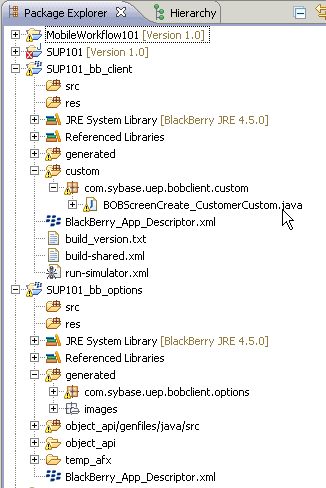
    bob_bb_package_explorer
  3. Open the BOBScreenCreate_CustomerCustom.java file and add this code in the method protected void configureControlById(int ID):
    case BOBPHONENUMBER:
      //Lets do some custom code here..
      //We'll add a validator. This validator is just checking that the string applies
      //a pattern match and passing in a REGULAR Expression
      Vector phoneNumValidatorVector = new Vector();
      phoneNumValidatorVector.addElement(
        new Validator(Validator.VALIDATION_TYPE_PATTERN_MATCH,
        Validator.PATTERN_MATCH_SUBTYPE_MATCHES_REGULAR_EXPRESSION,
          "[0-9][0-9][0-9]-[0-9][0-9][0-9]-[0-9][0-9][0-9][0-9]",
          "Enter a valid value of type 111-111-1111"));
      bobphoneNumber.setValidators(phoneNumValidatorVector);
      super.configureControlById(ID);
      break;
    This custom code validates that input in the phone number field is in the ###-###-#### format.
  4. Select File > Save.