The grid object archiving (GOA) editor lets you create and edit GOA inventory (.goi) files and GOA archive (.goa) files. The editor, when active, occupies the central editing pane of the Data Federation perspective.

When you open a GOA inventory, the editor displays the contents of the inventory in the left pane. The display in the right pane depends on what is selected in the left pane:
- Select an object to display its dependencies. (Dependencies are objects on which this object depends for input. For example, a data service might depend on one or more database operations.)
- Select the GDC at the top of the inventory list to display an Archive button you can use to create a GOA archive containing the objects in this inventory.
In the bottom pane, the Properties view displays information about the properties of each object in the inventory. The properties are shown on two tabs:
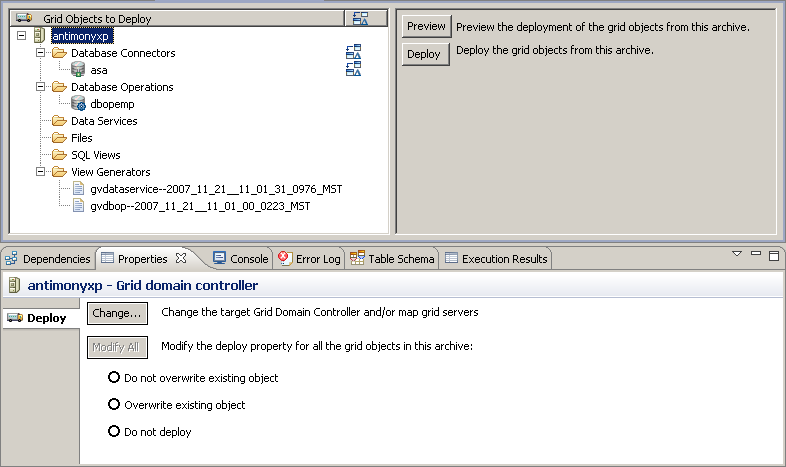
When you open a GOA archive, the editor displays the contents of the archive in the left pane. The display in the right pane depends on what is selected in the left pane:
- Select an object to display its dependencies. (Dependencies are objects on which this object depends for input. For example, a data service might depend on one or more database operations.)
- Select the GDC at the top of the inventory list to display Preview and Deploy buttons. Use Preview to test the deployment process for this archive. Use Deploy to deploy objects from this archive.
In the bottom pane, the Properties view displays information about the properties of each object in the inventory. The properties are shown on three tabs:
- The Overrides tab displays properties whose values you can change when you deploy archived objects.
- The No Overrides tab displays properties whose values you cannot change.
- The Deploy tab offers different options depending on what is selected in the left pane above:
Selection in left pane Deploy options Grid server - Change—Select a different destination GDC for this archive.
- Modify All—Edit the deploy property for every object in this archive. (The deploy property lets you specify whether to deploy an object and whether to overwrite an existing object with the same name.)
Category of objects (Data Services folder, for example) The Modify All button becomes active if you check either or both of the boxes: - Modify the grid server property—Select a different destination GDC for objects in this category.
- Modify the deploy property—Edit the deploy property for objects in this category. (The deploy property lets you specify whether to deploy an object and whether to overwrite an existing object with the same name.)
Object - Target grid server—Select a different destination GDC for this object.