Goal: Deploy the mobile application project that contains the database mobile business objects to the server.
Prerequisites
Finish the
Tutorial: Developing Database Mobile Business Objects. You must be connected to both the sampledb database and Unwired Server.
Task- Switch to the Mobile Development perspective.
- In Workspace Navigator, right-click in the SUP101 Mobile Application Diagram , and select Deploy Project.
- In the first page of the Deploy Mobile Application Project, accept the defaults, select Replication-based, and click Next.
- In the Contents page, select the customer and sales_order MBOs and click Next.
- In the Package Jars page, click Next.
Note: This window appears only if you are using the Advanced developer profile.
- In the Target Server page, from the list of available servers, select My Unwired Server and click Refresh.
Once connected, accept the default Domain and Security configuration settings, and click Next.
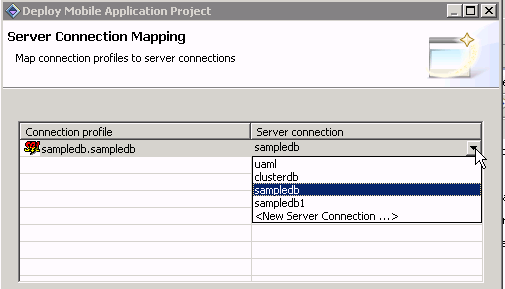
- If you have multiple server connections, the Server Connection Mapping page displays. Select the sampledb server connection from the drop-down list and click Finish.
The deployment progress window displays.
- In the Deployment status window, click OK.
A status window indicates progress and a successful deployment.
- To view the deployed project, in Enterprise Explorer, expand .
The server package sup101:1.0 into which you deployed the MBOs appears in the Packages folder. The two MBOs appear in the Mobile Business Objects folder.