Describes the data change notification process flow, and options available for diagnosing problems at each step of the process.
Process flow
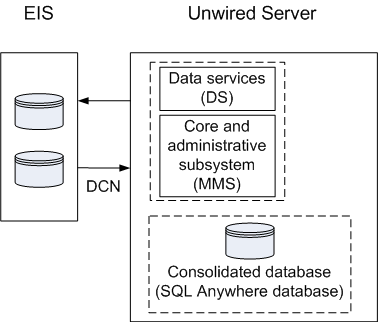
This diagram shows a logical view of data change notification (DCN) between the enterprise information system (EIS) and Sybase Unwired Platform components.
DCNs notify Unwired Server when data used by an application changes on an EIS server. DCNs are used as a strategy to update very specific data automatically. See Reference: Administration APIs and System Administration for development and administration information. See also Reference: Custom Development for Unwired Server for the DCN format and other details.
Troubleshooting options
This section describes the options available for diagnosing DCN processing flow problems.
- Verify the EIS data source (third party application, database, Web service) is running.
- Verify the DCN code is operating correctly.
Similar to cache, updates from DCN activity are propagated to devices based on a number of other settings. Review the change detection interval property associated with the synchronization group, the notification threshold of RBS subscription, or the push-related settings for the device (MBS).
- In Sybase Control Center, enable data services (DS) subsystem logging by setting its log level. The output is written in the server log.
- Review subsystem messages for information about getting data and sending transactions.
- For cache activities, you can enable monitoring on the package and then use Sybase Control Center to review cache statistics captured for the period monitoring is enabled.
- If you like to troubleshoot at the system-level (which will record all domain and package activities), you can enable MMS logging by setting the log level in Sybase Control Center. The output is written in the server log.
- Select the desired application package, and enable monitoring. The captured data appears in Sybase Control Center. Use package-level logging to review data in the domain log.
- On Unwired Server, review the errorlog.txt for any consolidated database system errors: <UnwiredPlatform_InstallDir\UnwiredPlatform\Servers\UnwiredServer\errorlog.txt.
- Enable monitoring to capture DCN request history and performance data.
- Check the DCN request log in the Unwired Server HTTP Request Log (< UnwiredPlatform_InstallDir\UnwiredPlatform\Servers\UnwiredServer\logs\<hostname>-http.log). The log shows a history of DCN requests, and performance data (including counts of total requests and processing time).