A description of how to dynamically register queries and streams.
Registering a query includes:
-
Creating the streams specified in the registered query.
-
Creating the statements specified in the registered query.
-
Compiling the CCL statements.
-
Loading the query into the server (the query name and the workspace that the query goes into are specified as part of the registerQuery() call).
-
Connecting ("binding") the stream names in the CCL statements to the existing streams (in other words, to the URIs of those streams), or creating new streams. Users can also specify a file name instead of a stream, in which case the content of the file is used as the runtime URI. See Stream Binding Runtime Configuration for more details. Users can also create and register queries through the SDK using the binding option on the c8_compiler. This is executable when working with project and CCL files. See Compile a Project or a Schema File for more details.
-
Starting execution of the query.
The query name must be unique within the specified workspace. The registered query is uniquely identified by the workspace name and query name, both of which are passed as part of the registerQuery()call.
A registered query may be stopped later.
There is no separate "start" method/function call. The query is started at the time that it is registered. After you stop it, there is no start/restart call; the only way to restart it is to re-register it. If you stop the query before you re-register it, you do not have to worry about having duplicate names.
A registered query may contain zero or more CCL statements, and may contain one or more streams. Typically, your registered query will contain at least 1 CCL statement and at least 2 streams (at least one for input from another project and at least one for output to another project). The streams for input and output to another project will be bound to streams in the other project(s). Your registered query may also contain streams that are not bound. For example, you may have additional streams that are local streams, used only to convey data from one CCL statement in the registered query to another statement in the same registered query. The diagram below shows proper usage of the register query capability in a simple case:
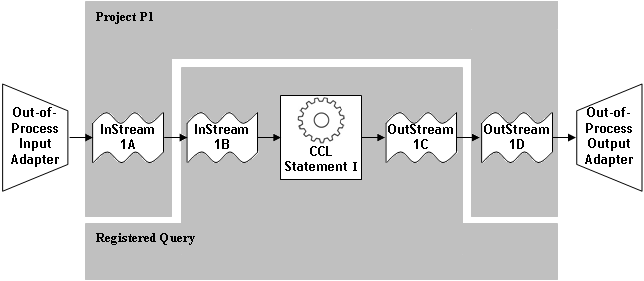
This example illustrates most of the key features and configuration elements of dynamic query registration. As you can see, we have created a project P1 that contains two streams. In this particular example, one of these streams is fed from an out-of-process input adapter, and the other stream writes to an out-of-process output adapter. When the query is registered, its CCL statement uses two streams that are bound to the streams in project P1.
Note that project P1 contains only streams.
The following is a more complex example, which shows multiple CCL statements in the registered query. Each of these statements is part of a chain with a unique combination of streams and statements, yet the diagram shows that in each case the registered query is structured the same way - with a CCL statement(s) and input and output streams. In 3 of these examples, the input and output streams of the registered query get their data from streams in another project, while in 1 of these examples the input and output streams get their data directly from out-of-process adapters. The registered query and project P1 fit together like jigsaw puzzle pieces - the registered query "plugs in" and uses the streams that were created in Project P1.
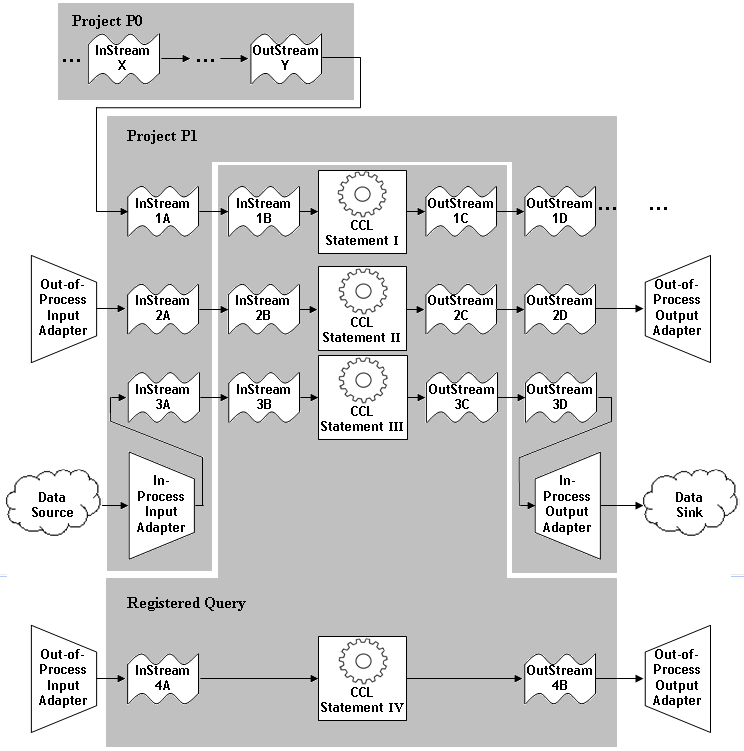
A dynamically registered query may contain zero, or more CCL statements. In this example, the dynamically registered query contains multiple CCL statements (CCL1, CCL2, and CCL3). Each CCL statement in the registered query uses streams that are bound to a stream in the project P1. (Note that project P1 contains ONLY streams; it has no CCL statements of its own.)
The streams in project P1 may get their data from (and write their data to) different sources:
-
From in-process adapters that are attached directly to the streams.
-
From out-of-process adapters.
-
From streams/queries in other projects (such as project P0).
Not all streams in a registered query need to be bound to streams in a project. The registered query may contain local streams, and may also contain input/output streams that are not bound. Those unbound input/output streams may be written to and read from by out-of-process adapters, and may be referenced by CCL statements in the registered query.
To use dynamically registered queries: