

Before you start Sybase Central, start the IQ Agent on the machines where the IQ servers will run.
On UNIX –
Start the agent using the S99SybaseIQAgent15 script.
Command S99SybaseIQAgent15 starts the agent at default port 1099.
Command S99SybaseIQAgent15 –port 3871 starts the agent at port 3871.
To verify that the agent is running, execute:
stop_iq -agent
For example, the following agent is owned by user ‘smith.’ Do not stop the server.
##owner        PID   Started    CPU Time       Additional Information
-------      -----    ------     -------        ------------------------
1: smith     15549    Feb. 18    10:38           PORT:2008
java -Diq.agent=/sun625742/users/smith/sybase/IQ-15_3/java/IQAgent1530.jar -D
Verify that the agent log exists.
The agent log file is $IQDIR15/logfiles/SybaseIQAgentNNNN.MMM.log where NNNN is the port number and MMM is a sequential number. If the environment variable IQLOGDIR15 is set, the agent log files are in the $IQLOGDIR15 directory.
On Windows –
The agent is configured to run as a service.
Start the Services Manager application to verify that the agent is running.
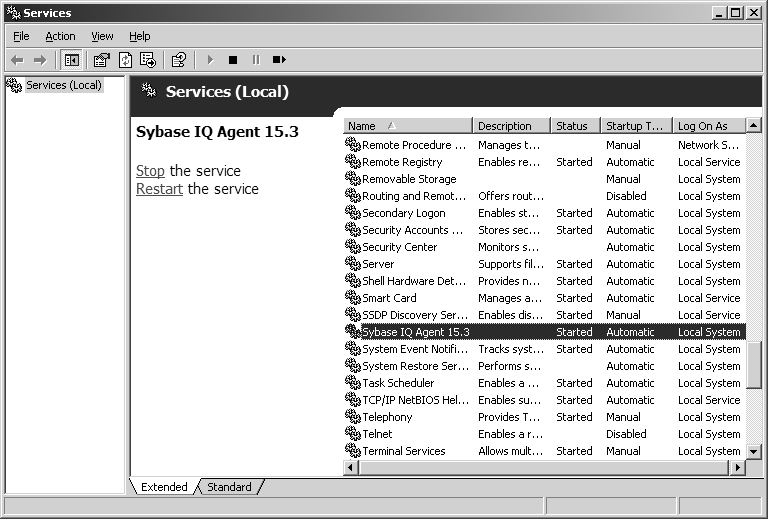
Verify that the agent log exists.
If you rebooted after installing Sybase IQ, the agent log file is %ALLUSERSPROFILE%\SybaseIQ\logfiles\SybaseIQAgent.NNN.log where NNN is a sequential number.
If you did not, the agent log file is in %SYBASE%\IQ-15_3\logfiles.
If the environment variable IQLOGDIR15 is set, the agent log files are in the %IQLOGDIR15% directory.
